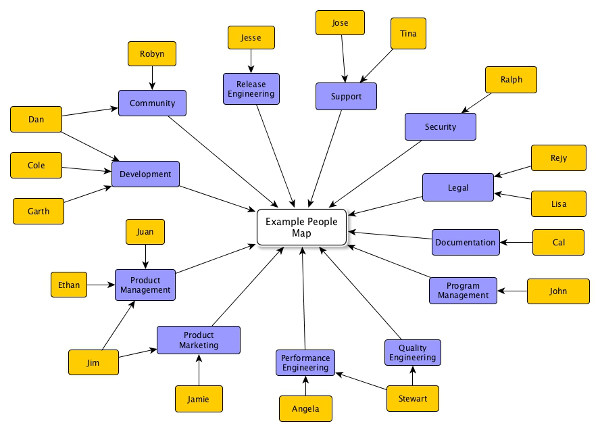
One of my favorite moments as a project manager was being told it was impossible to draw a picture of all the people on the project. Here’s how I did it.
Podcast: Download
Subscribe: Apple Podcasts | Android
Music
All songs licensed under Creative Commons
Transcript
This transcript was created automatically and may contain small errors.
Today, we’re shifting away from personal development and coaching to something I recorded a long, long time ago, but I still feel like the content is valuable, so I’m going to put it out there. It is in keeping, though, with my mission statement, which is bringing order to chaos and clarity to confusion. A lot of times, In a new project, there’s a lot of confusion. There can be chaos. And what I’m going to share today is one way to rein those things in.
People maps are an invaluable tool for getting really clear on who is working on a project, what their involvement is, how much you need to involve them, and sometimes how organized, disorganized, or clear the project team is. Particularly helpful in really Large or medium projects, maybe that you’re taking over, or a completely new project where you don’t know any of the people, or you know some of the people, but you’re not quite sure what’s going on. People map is simply a mind map with people’s names and functional groups or teams, whatever you want to call them. I talked to some people and they say, you know, I just can’t draw mind maps. I just don’t, they just, I don’t know what to do.
I don’t know where to start. Here, let me lay it out for you. It’s pretty simple. So then try this. Some of this just— and this is some of the magic and enjoyment, at least for me, that comes from drawing mind maps, which is simply start drawing.
And sometimes that’s the hardest part. So here’s an easy way to get started. Get a list of all the people, first and last names. I don’t recommend using first names unless it’s, you know, there’s 5 of you and it’s really clear who each person’s name is. I recommend first, last name.
So take each person’s name and put them in a box. I know it’s not usually a good idea to put people in boxes, but in this case it does make sense. So put each person’s full name in a box, just start writing them down. You can do this on a scrap piece of paper, on a whiteboard, or a mind mapping tool, which I kind of recommend a free drawing tool, not a mind mapping tool like FreeMind or XMind, which will enforce a limitation of a one-to-one relationship between boxes. You want a tool that will let you draw multiple connections between boxes, and we’ll get to that in a little bit.
For that, I recommend a tool called YED or Y-E-D. It’s a free tool. I don’t believe it’s open source, but it’s a free drawing tool and it’s pretty sophisticated for what you get. So put each person in a box, and after you’ve done that, create boxes for each of your functional teams. So in a traditional software project, that would be Development, release engineering, quality engineering, or QA, product management, legal, support, documentation, any like clear department or team that one or more people report to, create a box for it.
So now once you’ve got boxes of all the people and boxes of all the teams, you’re going to start drawing lines. So what you want to do is draw lines between each person and the functional team that they work on or report to. This is not intended to be an organization chart. It’s very frequent that people look at this and like, oh, look, this is an org chart. It is not an org chart.
I find that as a project manager, creating an org chart often creates nothing but problems. So you can have a little bit of org chartness in these pictures, and I think it can be helpful. But I would only use that from the perspective of identifying the lead for a particular area. So that one person you’re going to go to for development or that one person for QA. And as you draw lines from people to the functional team that they’re working on, it may be that you have one person that does multiple functions.
Not a problem. Well, it might be a problem on your project, but it’s just the whole point of this exercise is to capture the truth of what’s happening. And the truth is not right or wrong, it’s just the truth. So if Freddy is doing release engineering, development, and QA, draw 3 lines for Freddy. There’s nothing wrong with that, at least at this point of the exercise.
I’ve had some fun experiences drawing these pictures. I had one particular product— wasn’t really a product, it was kind of a product inside of a product. It was a some type of a— it was a type of update manager that went into a lot of different products. And I was taking this project over from another program manager, and that program manager told me it was impossible to draw. Because I was like, okay, who are all the people involved and who’s coming to this meeting that you’re running that now I’m supposed to be running and what’s going on?
Like, who is everyone? I said, I want to draw a picture of it. He told me it was impossible. Then I talked to the product manager. He told me it was impossible as well.
And I was like, well, we’ve got real problems here. If it’s impossible to draw a picture of all the people that are working on this project and what their relationship to what’s going on, there’s no way this project can succeed. So it was a very iterative process. I think I went through 5 or 6 or 7 different reviews, but at the end I had a picture. I think someone called it the spider web, or, I mean, it was, it was a tangled web of people and functions.
And it pointed out how complex this project was and in some ways how it was overly complex. There were more people involved than needed to be. The meeting was much bigger than it needed to be, and I was able to use this people map to trim down the meeting, get really focused on what we were trying to accomplish, who needed to be there, and then what needed to happen as a result. So if you get from someone or even yourself, this is impossible, I can’t draw this, you absolutely can. I guarantee it.
And if you’re in a situation where you say this is impossible to draw, send me an email. We’ll figure it out. I’ll help you draw it. You could send that to REDACTED and I’ll help you out. So once you’ve got all the lines going, you’ve got the people, you’ve got the functional teams, you’re drawing all these lines.
By the way, I don’t know that I would draw lines between functional teams. That might get confusing. So keep the relationships to— keep the relationship to people and teams. So you got the relationship going between people and teams.
Next thing you want to do is you want to get some review. You want to get some outside review of what you’re doing here. Again, I would— and I can’t emphasize enough how valuable these reviews are, even if they’re really negative, or if you get the occasional very direct, if not blunt, engineer that says, this is completely wrong. This is totally wrong. Which I’ve rarely found to be the case.
Usually there’s maybe a good portion of it that’s wrong or something that’s confusing, but that’s what you want though. You want enough of those, hey, this is totally wrong, because those people usually end up helping you kind of blow it up and get it to the next level. As you get further and further into the review cycle, the number of, hey, you need to change this type things, that starts to go down and go away. You’ll also find situations where maybe you have a person’s name that can’t be connected with a clear function on the team. Maybe this is kind of a classic product engineering team and you’ve got someone from finance that you’ve got their name.
You’ve got Susan from finance, but this is supposed to be an engineering product. So what is Susan? You know, where’s the box for Susan? There’s no— okay, so we’ll create a functional area for finance. But I think what you’ll start to find with some of these things is You’ll end up with some outliers, some people that just clearly were involved for some reason that maybe doesn’t make any sense to you, but it did at the beginning of the project, or it made sense to other people at the meetings who thought, oh, you know, Susan should be at these meetings too.
It involves money, so she should come. So after you’ve gone through a series of reviews, you should have a fairly clear sense as to who’s involved in this project. Again, if you’ve Designated, maybe made the box for leads a certain color or something like that. Sometimes that’s easier. Sometimes again, maybe a tiny mini org chart.
So maybe you’ve got a box for development, which points down to a box for the lead. And then you have all the peers, all the people reporting to that lead pointing to that person’s box, something like that. So that there’s a slight Hierarchy, so you kind of know who to go to. But again, this is not meant to be an org chart. Org charts cause all kinds of problems, is my experience.
So once you’ve got this picture, you should have a better idea of what’s going on with your project, who’s involved, who you need to involve, and more importantly, who you don’t need to involve. I find that in this one I drew for the, the impossible project that can’t be drawn, I found that I had a whole bunch of people that hadn’t been engaged with the project at all in months. They were needed at the beginning, they were no longer needed. Anyway, so getting this clarity on who’s involved and what they’re doing makes preparing the meeting, like who to invite to the meetings, running the meetings, it cleared up a whole bunch of confusion for me and in a lot of cases for the team. That was one of the more surprising parts of this exercise.
You would think all these people are working on this team, they all kind of know why they’re there. But it turned out, as I circulated this thing to different people for review, oftentimes they were like, I don’t know why that person’s involved. I don’t even— they never even come to the meetings. I don’t even know who they are. So you might be wondering, where do I get— I’m new to this team.
I don’t really know where should I start in terms of getting feedback on this? Picture that I’m embarrassed that it’s not very good and it’s probably wrong. Who do I give it to? My suggestion there is there’s usually one or two people that seem to be the most, I don’t know, kind of dialed into what’s going on, have a sense as to what should be happening with the project. Sometimes these people are spot on and sometimes they’re totally wrong.
Oftentimes it’s a lot in the middle. So oftentimes I’ll approach maybe the person I have the best rapport with or the person that seems to kind of Have the most sense of what’s going on. I’ll ask them to go over it with me. If I’m not in the same office, sometimes I’ll do a screen share. So I’ll just share my screen and say, help me connect the lines or clean this up.
Sometimes I’ll send it to them in advance review. Just think that one through a little bit. Sometimes it’s better to just kind of drop it on someone and say, what do you think? Particularly if they’re the type of people that are going to immediately forward it to 5 other people. That’s a case where screen sharing works best, or if you kind of feel like, well, this’ll be, this’ll be fine, or there’s not a lot of risk here, then, you know, giving an advanced review for someone that likes to kind of sit and reflect a little bit before giving feedback.
Kind of depends on the person. That’s kind of hard to know if you’re new to the project. So after sharing with this person that seems the most plugged in, a nice way to close out the conversation is just to say, so who do you think should look at this next? Like, who do you think on the team can give me the best feedback on their perspective or other things I might be missing? And take it from there.
And also another good closing question after you’ve kind of, you’ve presented this people map and you said, okay, here’s all the people that I understand are working on this. Here are what I understand of their functional, the functional team that they’re working with or for. What am I missing? So you’ve got the, hey, this is totally wrong, which is, you know, the lines are going to the wrong places, or the wrong names, you’ve got a misspelling, whatever.
The magic here is often, what am I missing? Who’s not on this picture that needs to be? And sometimes you’ll find that there are key people that should be involved that aren’t. And once you get them on the picture, people are like, oh yeah, that person should have been involved from the beginning. I don’t know why, but— Now they are.
A final valuable— so not only will this people map bring clarity for you and give you a really clear sense as to who’s doing what, it’s a quick visual. I’ve used it in Scrum teams where I had, I don’t know, 30 or 40, about 30 people. And I had Scrum teams of, oh, I don’t know, 6 to 7 people each. I would use this during the standups because it was A virtual standup, I work remotely and a lot of the people on the teams are, I would just use it as a roll call just to kind of go around in the circle and to call people out. So not only is this people map a useful tool for just having the big picture of who’s doing what, it’s a super nice reference to go back to whether you’re setting up a new meeting, trying to figure out who you need to call on at a particular meeting.
I’ve also found that this tool builds credibility with the team because once it’s established and you share it with the whole team, there’s a sense as to you kind of know what’s going on. You’re not, yeah, you’re new. You’re trying to come up to speed with the project, but it’s a way of kind of demonstrating back to the project team that you know what you’re doing and you kind of have a handle on who’s doing what and what’s going on. I’ve also seen it build confidence that, wow, this guy is new. We thought he was kind of an idiot, or we didn’t think that he could take over this complex thing.
And in a matter of days, he’s managed to untangle this twisted web of who’s doing what that a lot of us weren’t even sure. Wow, maybe this guy’s going to turn out to be pretty good and actually a valuable project manager to this project. I find a lot of times people kind of discount or don’t see the value of project managers. And this is an easy win in terms of establishing credibility with a new team. So if you’ve got questions about people maps, how to draw them, where to get started, tools, whatever the case might be, send me an email to REDACTED, and I’ll do my best to help you take some next steps.

September 30, 2017 at 11:43 am
Good one!